

The Ultimate Moving House Internet Checklist (Without the Stress)
Moving house has a talent for turning small tasks into a full-scale operation. Between keys, removalists, utilities and address changes, internet setup is easy to leave until the last minute. That is usually when the stress begins: the new address has a different connection type, the nbn box is missing, a technician is required, or the router has disappeared into a box labelled “miscellaneous”.
Most moving house internet problems are avoidable with a little planning. The new property is a new service address, even when you stay with the same provider. Availability, network technology, equipment and activation time can differ. Occom’s view is simple: moving is stressful enough, and your internet should not add another layer of confusion.
Your Moving House Internet Checklist at a Glance
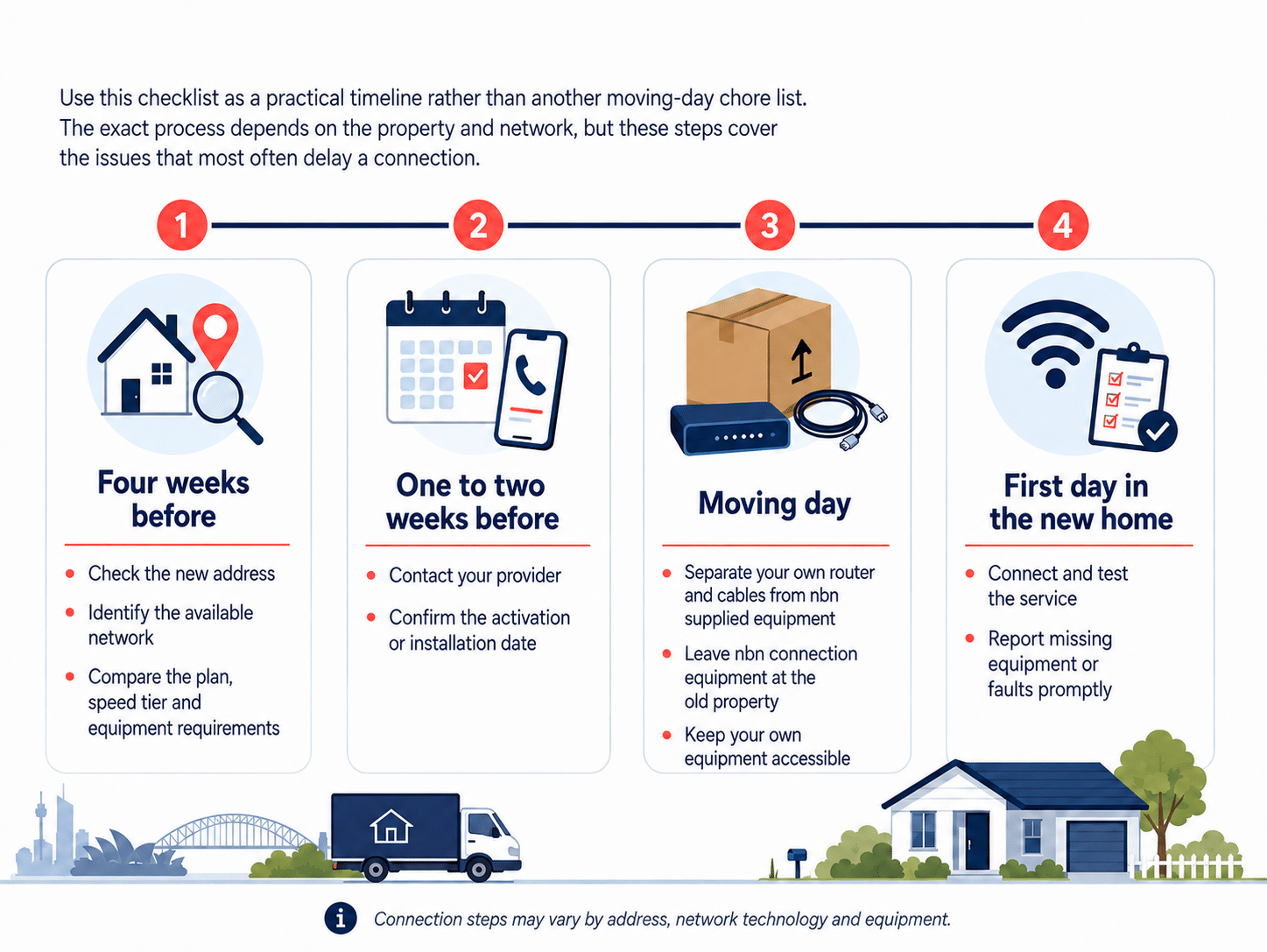
- Four weeks before moving: check the new address and identify the available network.
- Two to four weeks before moving: compare the plan, speed tier and equipment requirements.
- One to two weeks before moving: contact your provider and confirm the activation or installation date.
- Before packing: separate your own router and cables from nbn supplied equipment.
- On moving day: leave the nbn connection equipment at the old property and keep your own equipment accessible.
- After moving in: connect, test and report missing equipment or faults promptly.
Four Weeks Before Moving: Check the New Address
Review the Plan and the Home Setup Separately
Do not choose a faster plan simply because the new home is larger. Plan speed and Wi-Fi coverage solve different problems. A higher speed tier increases the capacity delivered to the premises, while good router placement, suitable hardware, Ethernet or a properly planned mesh system improves coverage inside the home. Check both before spending more.
One to Two Weeks before moving: book the connection
Contact your provider as soon as the moving date is reasonably firm. nbn’s moving home guide recommends planning more than four weeks ahead where possible, while Occom recommends contacting the team at least one to two weeks before the move. Earlier notice gives everyone more room if a technician, replacement connection box or building appointment is required.
Provide the full new address, preferred connection date, access details and a reliable mobile number. Ask whether the service can be activated remotely or whether someone over 18 must be present for an appointment. Confirm the expected timeframe in writing and keep the order reference. If uninterrupted internet is essential for work or study, consider a short overlap between the old and new services rather than cancelling the old connection too early.
Confirm whether the plan can be transferred or a new order is required, and ask about relocation, activation, equipment, contract and cancellation terms. A transfer can still need different hardware when the network changes.
What stays at the old property, and what comes with you?
Moving day: keep the internet equipment out of the mystery box
- Photograph the old connection setup before unplugging your own router.
- Leave all nbn supplied equipment, power adaptors and fixed cables at the old address.
- Keep your router, modem router, mesh units and labelled cables with you.
- Locate the connection box, telephone socket or communications cabinet before unpacking everything.
- Keep mobile data or another backup option available if the connection is delayed.
- If it is unsafe to speak, listen to the operator and use the “press 55” option when instructed.
First Day in the New Home: Connect, Test and Optimise
Special situations that need extra planning
Some homes need extra planning. Raise these points with your provider before the move rather than discovering them after the boxes arrive:
- Renters: confirm whether installation, drilling or equipment relocation requires landlord or property-manager approval.
- Apartments: ask about building access, communications rooms, concierge procedures and appointment restrictions.
- New developments: check whether the address is registered and ready for connection.
- Medical alarms and priority services: confirm compatibility,power and backup arrangements before disconnecting anything.
- Home phone, security and smart-home equipment: confirm whether each service needs reconfiguration.
- Work and study: keep a charged mobile phone, hotspot option or another temporary connection available for essential tasks.
Should you Transfer your Service or Switch Providers?
Compare the total position, not only the promotional monthly price. Check service availability, typical evening speed information, equipment compatibility, activation timing, relocation costs, contract notice, cancellation terms and support access. Review your current agreement before cancelling. The ACCC’s contracts guidance is a useful reminder that terms and exit conditions matter, especially when a move happens during a fixed term.
The no-stress rule
How Occom can Help with your Move
Occom can help existing and new customers check service availability, network type, plan suitability and router compatibility at the new address. The Occom Help Centre advises customers to contact Occom one to two weeks before moving. Where the required equipment is already installed, remote activation may be possible; where it is not, the team can explain the setup steps and likely timeline.
For customers who move more often, Occom’s Pack & Plug Premium Moving Service is designed to make eligible 24-month plans more portable across nbn and several private fibre networks. The current service includes pre-configured Occom hardware and access to support when the new property has connection complications. Eligibility, coverage, pricing and terms should be confirmed when ordering.
The point is not to pretend every move is identical. It is to give you a clear path, realistic expectations and a real person to contact when the property does not match the neat diagram. Visit the Occom Contact Us page, call 1300 299 999 or email support@occom.com.au. Support is available daily from 8:00 am to 10:00 pm AEST, including weekends and public holidays.
Frequently asked questions
How early should I organise internet before moving house?
Can I take the nbn connection box to my new home?
No. Leave nbn supplied connection boxes, power adaptors and associated cables at the old property. They are registered to that address and are needed by the next resident.
Should I take my router when I move?
Will my current internet plan work at the new address?
What should I do if the nbn equipment is missing at the new home?