


Is 25Mbps Internet Speed Enough?
Is 25Mbps Internet Speed Enough for Your Household?
What Does 25Mbps Internet Speed Actually Mean?
1. Your Wi-Fi signal is weak where you actually use it
How Many Devices Can 25Mbps Support?
| Household activity | Likely experience on 25Mbps | Main pressure point |
|---|---|---|
| Browsing, email and social media | Comfortable for several devices | Usually Wi-Fi coverage, not plan speed |
| One HD stream plus light browsing | Comfortable | Little concern in normal conditions |
| One 4K stream plus phones | Usually workable | Limited spare capacity |
| Gaming plus one HD stream | Usually workable | Latency and game downloads |
| Two HD video calls | Possible with a stable connection | Upload speed and Wi-Fi |
| Multiple 4K streams or large downloads | Likely constrained | Total shared bandwidth |
25Mbps Compared With Other Internet Speed Tiers
| Speed tier | Typical household fit | Common activities | Where it can struggle |
|---|---|---|---|
| 12Mbps | One light user | Email, browsing, social media, one modest stream | Multiple users, HD calls and large downloads |
| 25Mbps | One to two moderate users | HD streaming, one 4K stream, gaming, one main video call | Busy households and simultaneous heavy use |
| 50Mbps | Small to medium household | Multiple streams, gaming, video calls and everyday downloads | Very large households or several 4K streams |
| 100Mbps | Busy household or remote-working home | Multiple 4K streams, faster downloads and concurrent calls | May still need better Wi-Fi coverage |
| 500Mbps+ | High-demand or large household | Large downloads, content creation, many devices and premium use | Devices and router may limit usable speed |
*Equipment upgrades may improve coverage but are not mandatory for your core NBN service to function
Is 25Mbps Enough for Streaming?
For one television, 25Mbps is enough for most mainstream streaming. at least 3Mbps for 720p HD, 5Mbps for Full HD and 15Mbps for 4K. That means a 25Mbps connection can comfortably carry several lower-resolution streams or one 4K stream when the connection is otherwise quiet.
The pressure starts when activities overlap. One 4K Netflix stream may use around 15Mbps, leaving roughly 10Mbps for every phone, laptop, smart speaker, update and background process in the home. Another high-quality stream or a large download can push the connection close to its limit. The service may respond by lowering video quality, taking longer to load or buffering.
- One HD stream: usually comfortable, with room for browsing and messaging.
- Two or three HD streams: possible, but performance depends on the platform, Wi-Fi and background usage.
- One 4K stream: generally possible, although simultaneous heavy use may cause buffering.
- Two 4K streams: not a reliable target for a 25Mbps household.
Is 25Mbps Enough for Online Gaming?
Is 25Mbps Enough for Working or Studying From Home?
Zoom currently recommends approximately 3.8Mbps download and 3.0Mbps upload for 1080p one-to-one or group video. On a well-performing 25Mbps service, one high-definition meeting leaves reasonable download headroom. Upload activity can become the tighter constraint when cloud backup, large file transfers, security cameras or another video call runs at the same time.
- One video meeting plus email and cloud documents: generally suitable.
- Two simultaneous HD video meetings: may work, but upload demand and Wi-Fi quality become important.
- Frequent large file uploads, livestreaming or cloud production work: a faster plan is advisable.
- A home with several workers or students online together: 50Mbps or 100Mbps usually provides safer headroom.

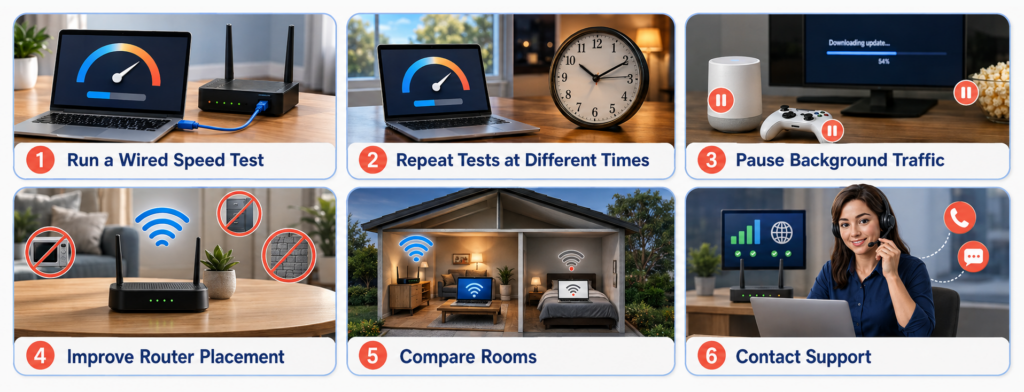
Why Can a 25Mbps Plan Still Feel Slow?
Common causes of poor performance include:
- The router is hidden in a cupboard, placed on the floor or positioned at one end of the property.
- Several devices are downloading updates, backing up photos or streaming without the user noticing.
- The device is connected to a crowded 2.4GHz band when 5GHz would provide faster short-range performance.
- The home has thick walls, multiple floors or long distances that require mesh Wi-Fi or an additional access point.
- The test is being run over weak Wi-Fi rather than through Ethernet near the router.
- The connection technology, internal cabling, network congestion or a fault is reducing performance.
Who Should Choose 25Mbps and Who Should Upgrade?
Simple decision rule
Choose 25Mbps when usage is moderate and usually sequential. Choose 50Mbps or faster when heavy activities regularly happen at the same time.Occom 25Mbps NBN Plan
Final Takeaway
FAQ
Is 25Mbps fast internet?
Can I watch Netflix in 4K with 25Mbps?
Is 25Mbps enough for gaming?
Is 25Mbps enough to work from home?
How many people can use 25Mbps?
How long does a 10GB download take at 25Mbps?
Should I choose 25Mbps or 50Mbps?
Why am I not getting 25Mbps over Wi-Fi?
Q&A
What can a household realistically do with a 25Mbps internet connection?
What is the biggest limitation of a 25Mbps plan?
Does upgrading from 25Mbps always fix slow internet?
What should I compare before selecting an NBN speed tier?